
I've had the Roborock RockMow Z1 in my garden since February, and after months of mown lawns, rain, slopes and the odd too-tight corner, it's time to put together a full review. This isn't a trade-show preview: it's what I've learned from living with the robot every day.
Category: Premium robot lawn mower with RTK + VSLAM and all-wheel drive. Test period: from February 2026 — daily use in my garden. Launch in Italy: early May 2026.
- What it is: an autonomous robot lawn mower with no perimeter wire, using RTK + VSLAM fusion navigation (Sentisphere), AWD with 4 independent motors, 4 cameras for obstacle avoidance and an integrated 4G SIM.
- Who it's for: gardens between 1,500 and 5,000 m², terrain with slopes of up to 80% (38.7°), and anyone who has already made peace with the limits of the perimeter wire.
Overview
Roborock officially enters the world of robot lawn mowers with three models: the RockNeo Q1 for medium-sized gardens, the RockMow S1 for the mid-range, and the RockMow Z1, the model I was able to test and the flagship of the range. It's designed for large gardens, up to a claimed 5,000 m², and for those who want no compromises on slopes, obstacles and cutting precision.
On paper it is already an important product: all-wheel drive with an independent motor on each wheel, navigation combining full-band RTK and VSLAM, independent spring suspension, active steering, a six-blade disc, obstacle avoidance with four cameras, and 4G coverage as standard. But the market is full of robot lawn mowers that look perfect on paper. What matters is how it behaves in the garden, in the rain, after you've forgotten to clean the wheels, after three weeks of continuous work. This review starts from there.
What changes compared with perimeter-wire robots
For anyone coming from a "traditional" robot lawn mower, the kind with the perimeter wire buried along the edges of the lawn, the leap is significant. It's worth describing, because it's easy to underestimate if you haven't lived it.
With a perimeter-wire robot, installation is half of the product: you have to dig a small trench around the whole perimeter of the garden, lay the wire, secure it with pegs and connect it to the base. If you move a flower bed, the wire has to be repositioned. If it breaks (and sooner or later it does, especially after a freezing winter), the robot no longer knows where it is. The cutting logic is largely random: the robot goes wherever it happens to go, as long as it has battery.
The RockMow Z1 does away with this paradigm entirely. There is no wire and no physical perimeter. The garden is defined just once, from the app, by "drawing" on the virtual map the robot builds on its first pass. Flower beds, exclusion zones, crossing points — everything is virtual and can be edited at any time. Cutting isn't random: the robot follows parallel lines, recognises where it has already mown and where it hasn't, and handles zones with different schedules.
Put simply, you go from a device that "wanders" to one that "works". And once you're used to it, going back is unthinkable.
Unboxing: what's in the box
The product arrives in a single box, surprisingly compact considering how much is inside. Roborock has published an official guide to the full setup (link at the end of this section) that shows exactly the assembly sequence; what I describe here is the same procedure, experienced first-hand.
Opening the box, you find the robot, the charging base with its power supply and cable, and the RTK kit: the RTK base, a dedicated power supply, a pole, a cable extension, fixing screws and an antenna positioning manual. Everything you need for installation is already in the box, and that detail matters: it means that on the day the robot arrives you can really get it running, without discovering afterwards that you're missing a cable or a bracket.
The robot itself is massive: a different category altogether from the perimeter-wire models we're used to seeing in gardens. The studded wheels, the sturdy body, the suspended structure: the first tactile impression is of a machine built for serious outdoor work, not a battery-powered toy.
The charging base is simple and no-frills, with a front connector and a cover for the winter season. It is designed to stay outside, exposed to the weather, with the robot parking on top of it after every cutting session.
The only component supplied separately is the PreciEdge module — the optional accessory for trimming edges to 3 cm. It isn't part of the standard kit and has to be bought separately. I bought and fitted it, and in the maintenance section of the app it shows up as a tracked component like all the others (4 hours of use, 98% of its life remaining at the time of this review). For anyone with lots of edges (fences, flower beds, low walls) it's an addition worth considering when ordering, so you have it from the very first setup.
Procedural reference: RockMow Z1 / X1 — Official Roborock Unboxing & Setup (Roborock Support channel).
Setup and installation: the RTK antenna is the critical point
Installing the RockMow Z1 takes three distinct phases, and understanding the logic of each makes the difference between a good experience and a great one.
Phase 1 — Placing the charging base
Place the charging base on a flat spot in the garden, well covered, ideally with some shelter from driving rain. The spot must be accessible to the robot from at least two sides: it needs free "manoeuvring space" in front, because the robot approaches the base in a straight line. The base must be connected to the mains with the dedicated cable, and if you don't have an outdoor socket, this is the time to plan for one.
Phase 2 — Placing the RTK antenna
Everything depends on where you put it. Roborock asks for the classic "clear sky" above the antenna — no branches, no roof, no gutters nearby. The first time I put it somewhere that looked open to me, but there was in fact a tree fairly close by, and the robot suffered for it: less clean tracks and a few small positioning errors on the turns, especially under the canopies.
Moving it to a genuinely open spot, on top of a pole where the app confirms the quality of the fix, changed everything. From that moment the robot moves as if it knew exactly where it is to the centimetre: straight parallel lines, minimal overlap between passes, a punctual return to the base. The RTK antenna is the piece that makes the difference between a good experience and an excellent one, and it's worth spending ten extra minutes on it during the first setup.
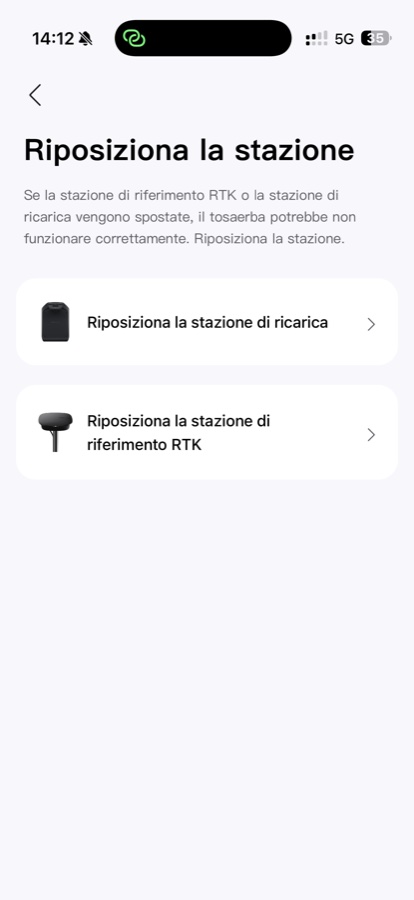
The golden rule is: if you doubt whether that tree is too close, it is. Move the antenna half a metre further away and check the fix quality again in the app. It's a job you do once and it lasts for the whole life of the product. If for some reason you need to move the charging base or the RTK antenna later, the app has a dedicated "Reposition the station" function that guides you through the reconfiguration step by step, without having to repeat the mapping from scratch.
Phase 3 — Mapping the garden
Once the base and antenna are switched on, you proceed to the first mapping pass. The app guides everything: you walk the perimeter of the garden with the robot in manual mode (remote control from the app), define the exclusion zones (flower bed, swimming pool, play area, vegetable patch), and confirm. The robot builds its internal map and from then on it is autonomous.
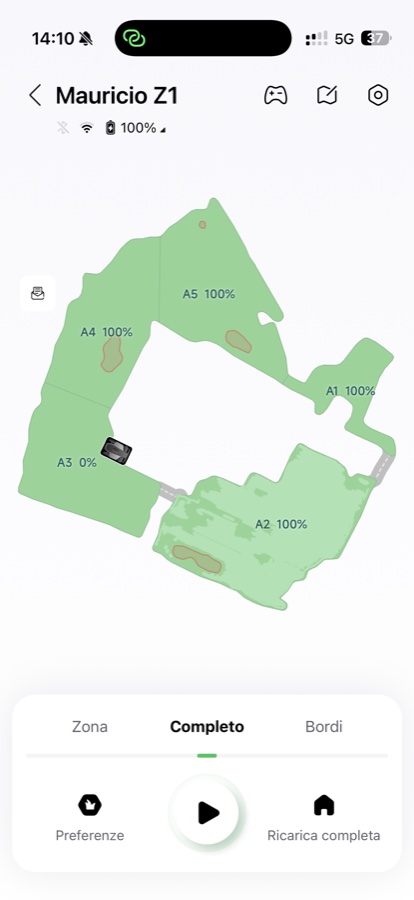
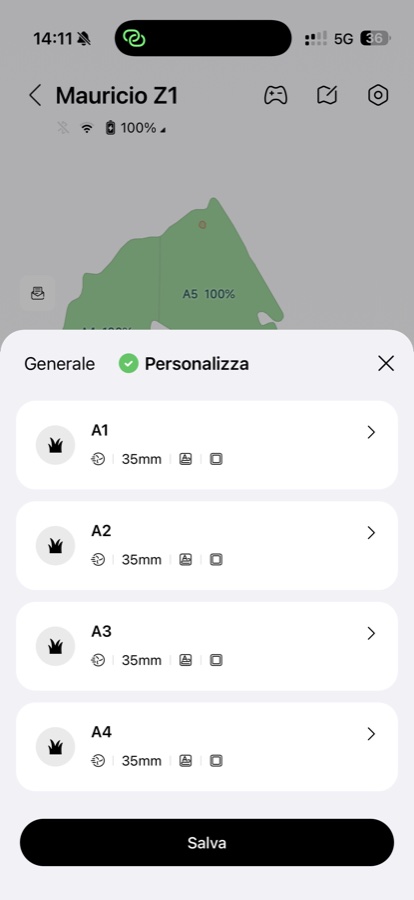
The first pass needs care, especially along the edges: it's better to take an extra half hour and do it properly the first time. Later changes are possible — you can add zones and modify boundaries — but a clean map at the start is the foundation of everything. In my garden I defined five zones (A1–A5) to manage different schedules and cutting modes depending on the area.
Navigation: RTK + VSLAM, finally done seriously
The RockMow Z1's navigation system, which Roborock calls Sentisphere Environmental Perception, fuses full-band RTK and VSLAM (visual SLAM, or visual localisation). Put simply: RTK tells it where it is in the garden with centimetre precision, while VSLAM visually recognises where hedges, trees, low walls and the robot itself are when the satellite signal isn't perfect for a moment.
What's interesting is that I never notice a drop in quality under the trees or near the wall of the house, where RTK alone would struggle because of the limited view of the sky. The robot keeps cutting consistently, the lines stay parallel, the overlaps are minimal. When I go out in the morning and see the garden already done, the cutting pattern is that of a machine that knows how to move, not of a robot wandering about.
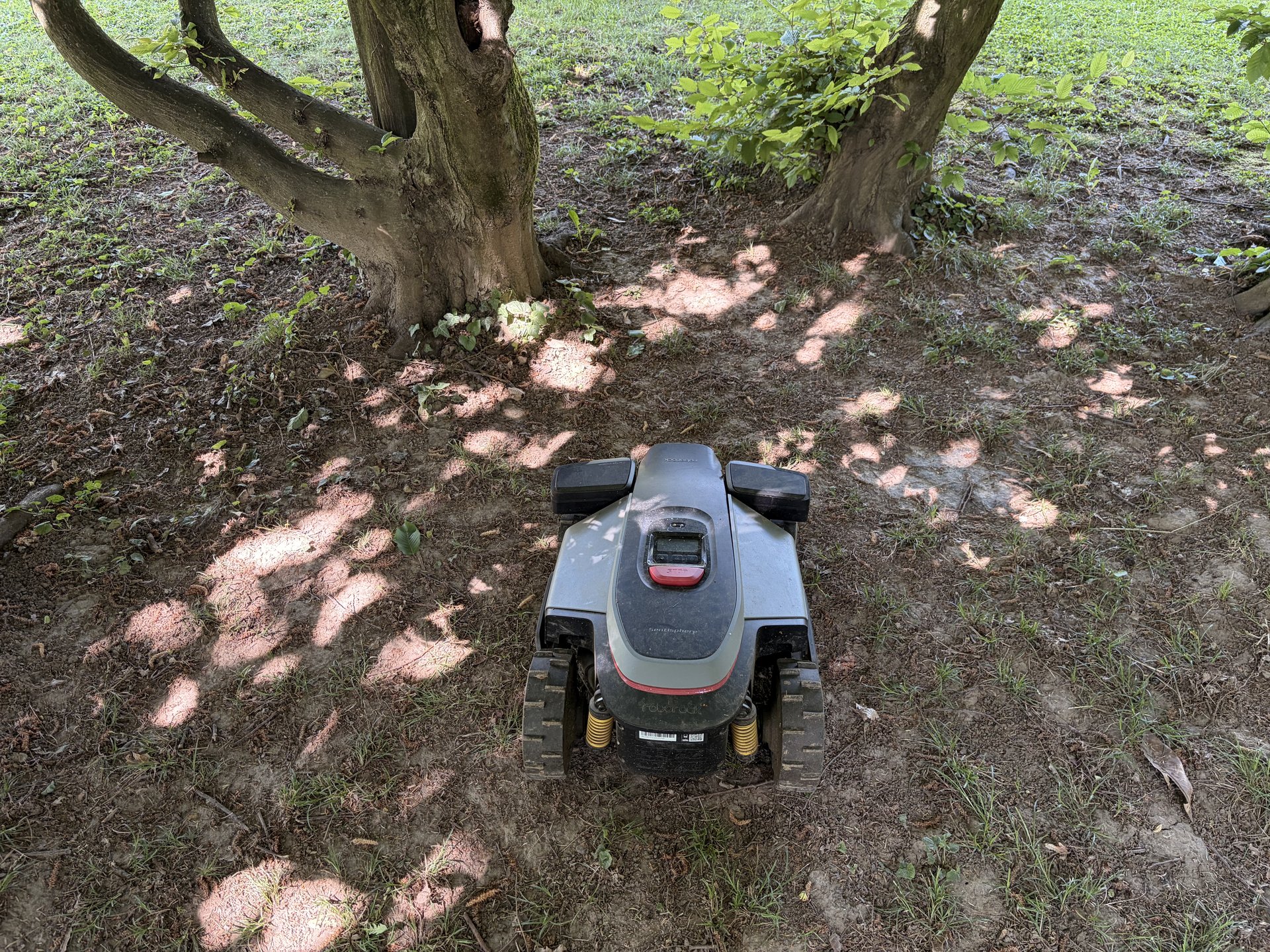
Obstacle avoidance, based on four cameras, is cautious just the right amount. It recognises objects left on the ground (a hand brush, a toy, an unwound hose) and steers around them. In the months of testing I never saw it try to drive over something solid or push objects — behaviour worth noting when comparing it with robot lawn mowers of earlier generations which, it must be said, were regularly thrown by these situations.
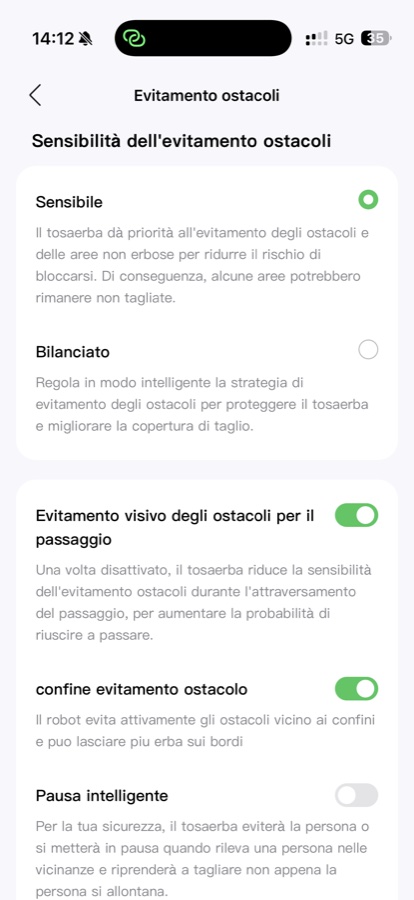
One thing I like about the app is that the sensitivity of obstacle avoidance can be tuned: Sensitive prioritises safety (some areas may be left uncut to avoid any risk), while Balanced optimises coverage. There are also two finer modes, visual avoidance for passages (which lowers the sensitivity in narrow corridors to increase the chances of getting through) and obstacle avoidance boundary, for staying closer to the edges and leaving less long grass.
Cutting: a six-blade disc and PreciEdge
The RockMow Z1's cutting module uses a rotating six-blade disc with a double anti-tangle layer. The height can be adjusted from the app between 20 and 70 mm in 0.1 mm steps, a level of granularity I honestly had never seen in this category. The most useful thing isn't so much the absolute precision of the height as being able to raise the cut by half a centimetre in the driest weeks and then bring it back to normal when the damp returns, without having to go out and adjust it each time.
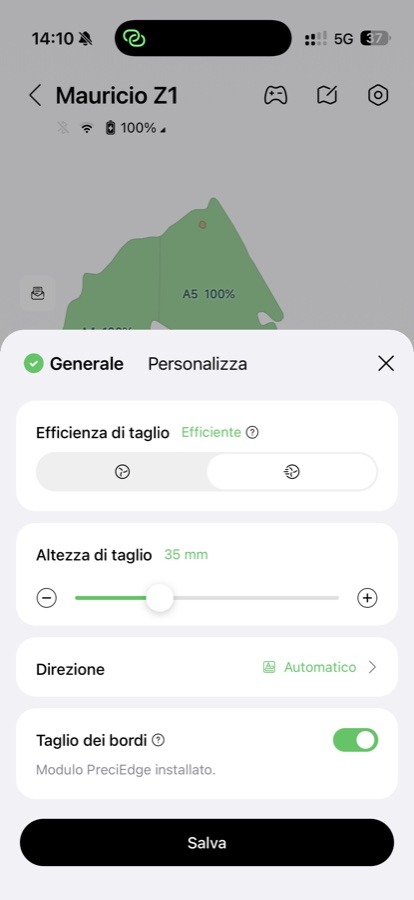
The cut itself is clean: the grass is finely mulched and falls back as natural fertiliser. The look of the lawn visibly improves after a few weeks of daily passes: fewer tufts, fewer uneven patches, and none of the inconsistent cutting stripes you get with perimeter-wire robots.
The optional PreciEdge module lets you bring the cut to within 3 cm of edges (walls, fences, flower beds), further reducing manual trimming. It isn't included in the base package, but it's worth considering if you have a lot of edges. A useful feature for gardens with different areas is per-zone customisation: you can set a different cutting height, direction and working mode for each mapped area.
The one real drawback: narrow passages
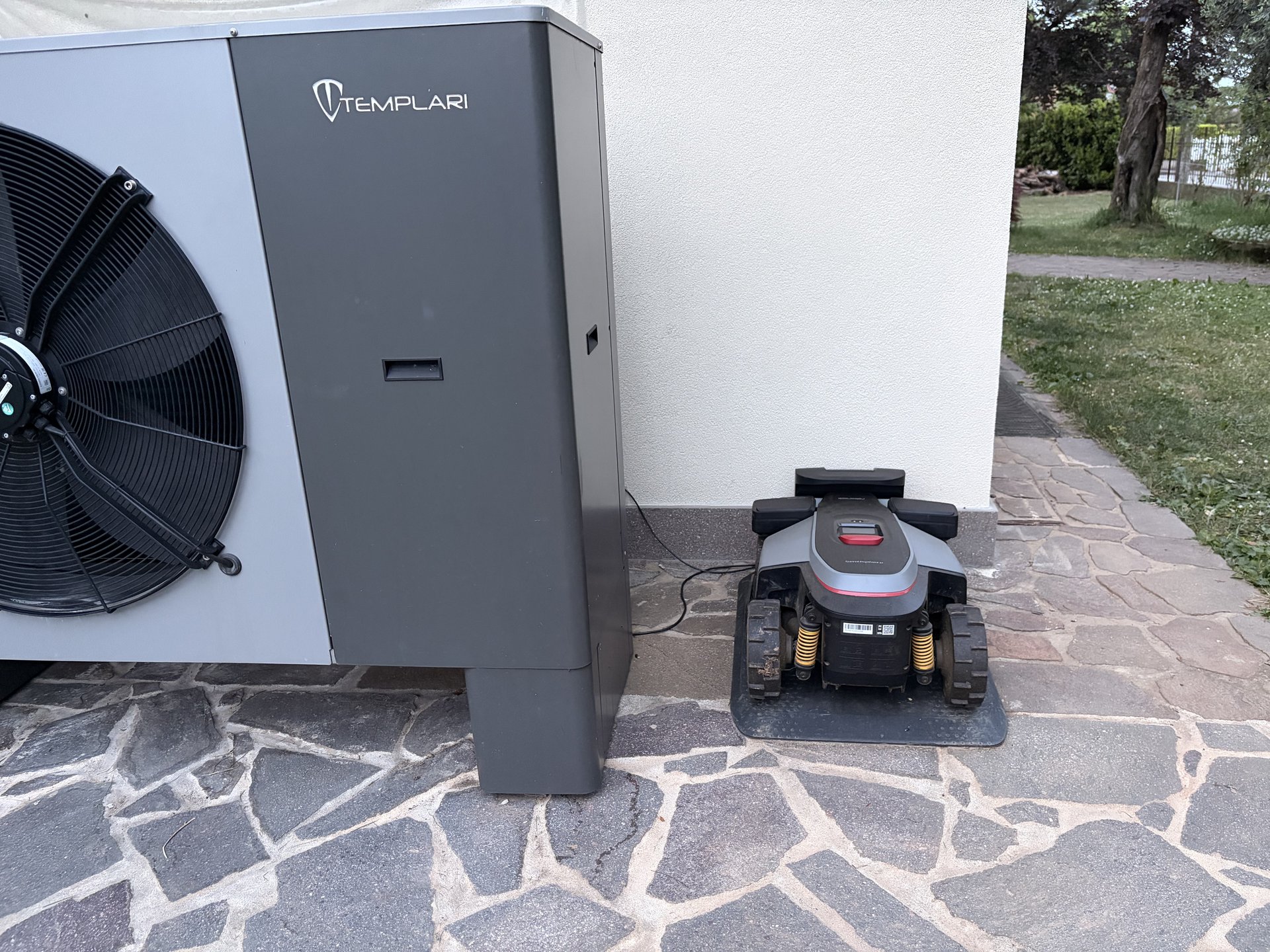
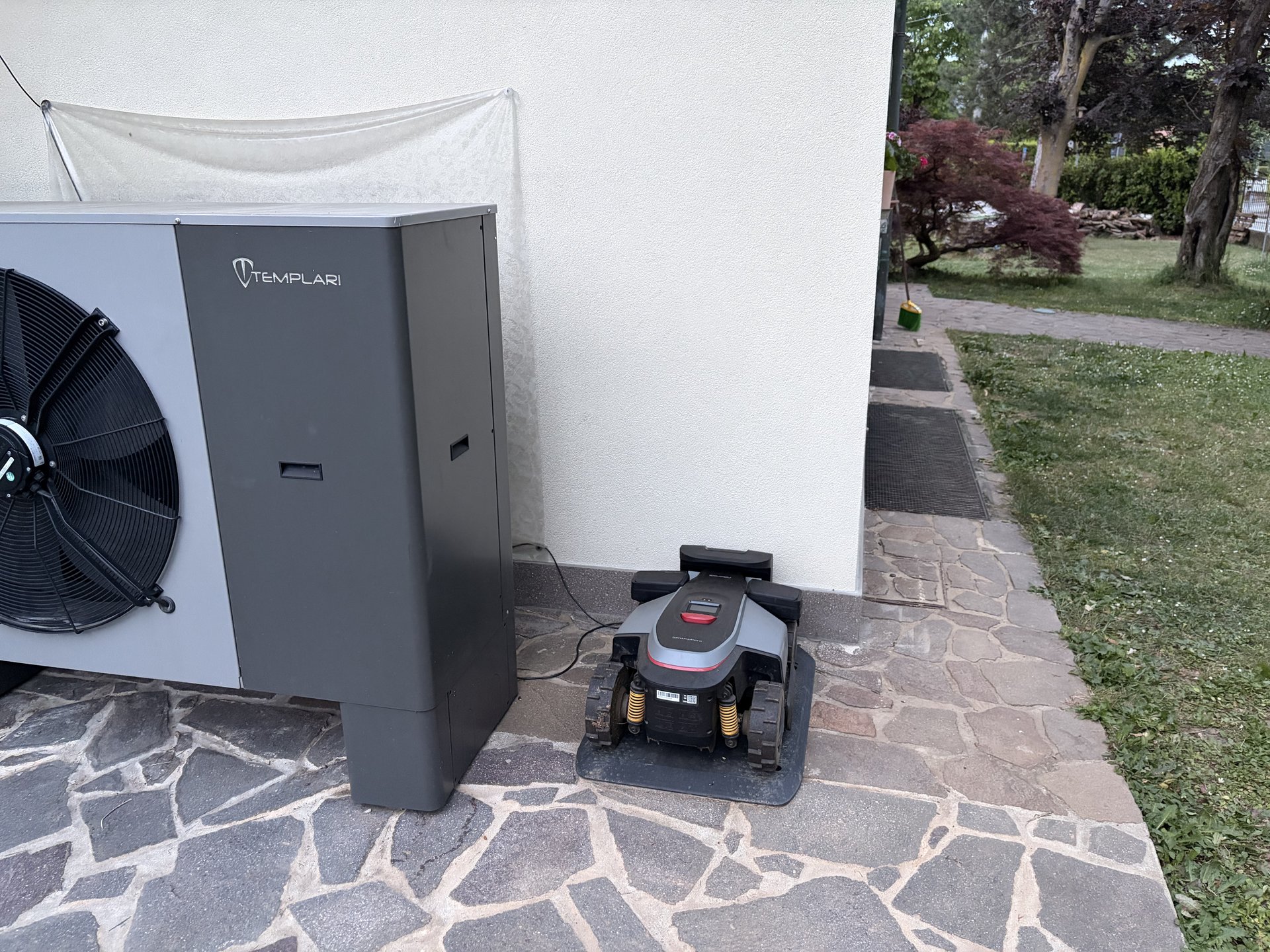
Now to the point that, so far, is the only real limit of the RockMow Z1 in my garden. By design, the robot leaves a safety margin to the right and left of the cutting disc. It's a smart choice — it protects the robot from side impacts and the hedge from accidental contact — but it means that in the narrow passages of the garden, below certain widths, it simply doesn't get through.
Roborock states that it can handle passages of 0.8 m. In practice, on passages around that width the robot is cautious and in some cases prefers not to enter so as not to take any risks. The result: there are two or three strips of lawn in my garden where I have to go over by hand with a brush cutter once a week. Nothing dramatic — it's a few minutes — but it is honestly the only thing that, after months of testing, I feel I can point to as a real limit.
It's a compromise that makes engineering sense, but anyone buying a robot to forget about the lawn needs to know that below a certain width the robot won't completely replace manual finishing. Incidentally, it's behaviour I notice in all RTK robot lawn mowers with these body dimensions, not a problem specific to Roborock. But it is a behaviour, and it needs saying.
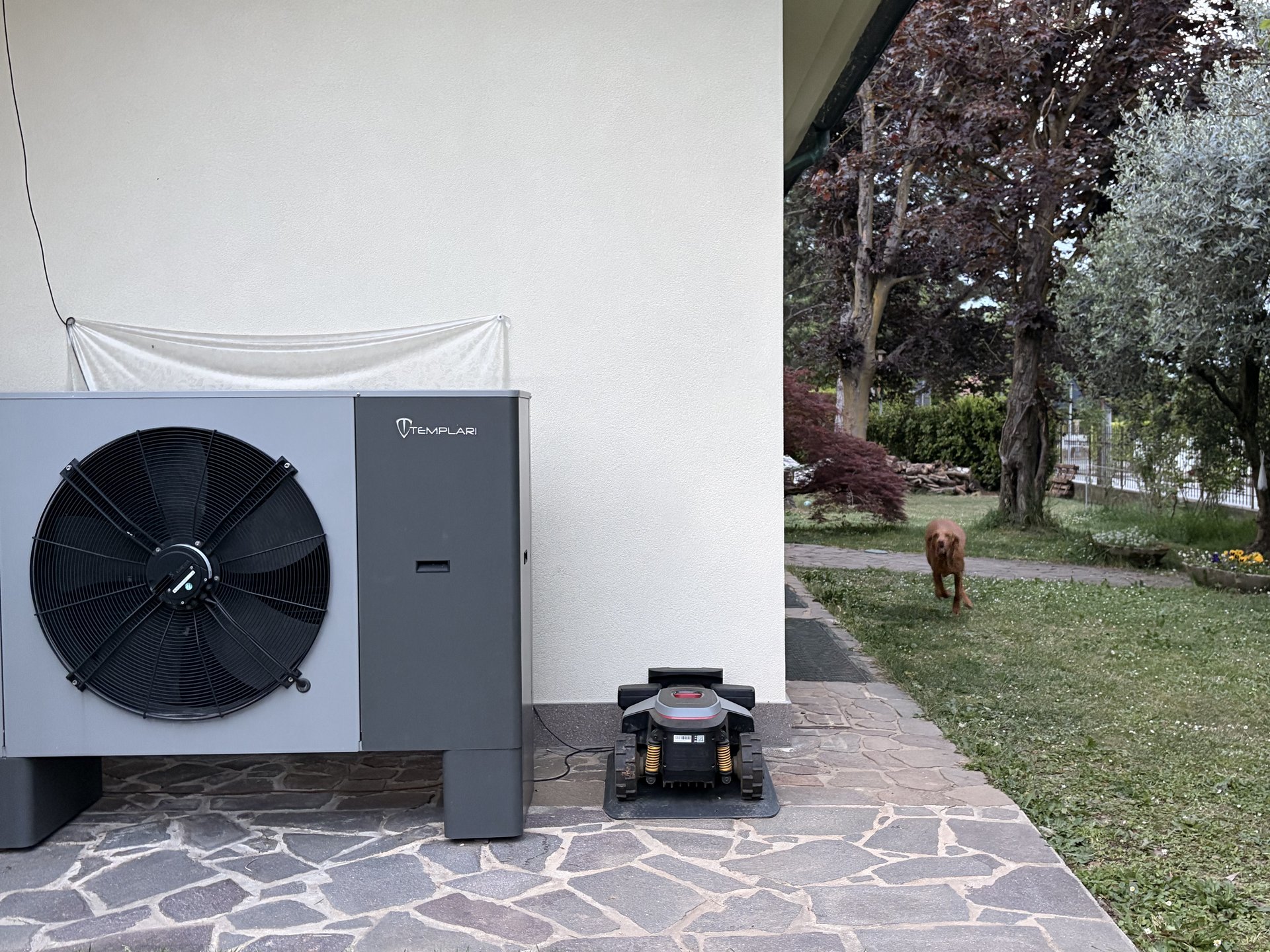
Real narrow passages: the heat pump area
This is a real case from my garden. The RockMow Z1 has to travel along a stone corridor between the Templari heat pump and the lawn. It's exactly the kind of "0.8 m, but with constraints" scenario in which the software imposes the lateral safety margin I mentioned above.
Slopes, uneven ground and all-wheel drive
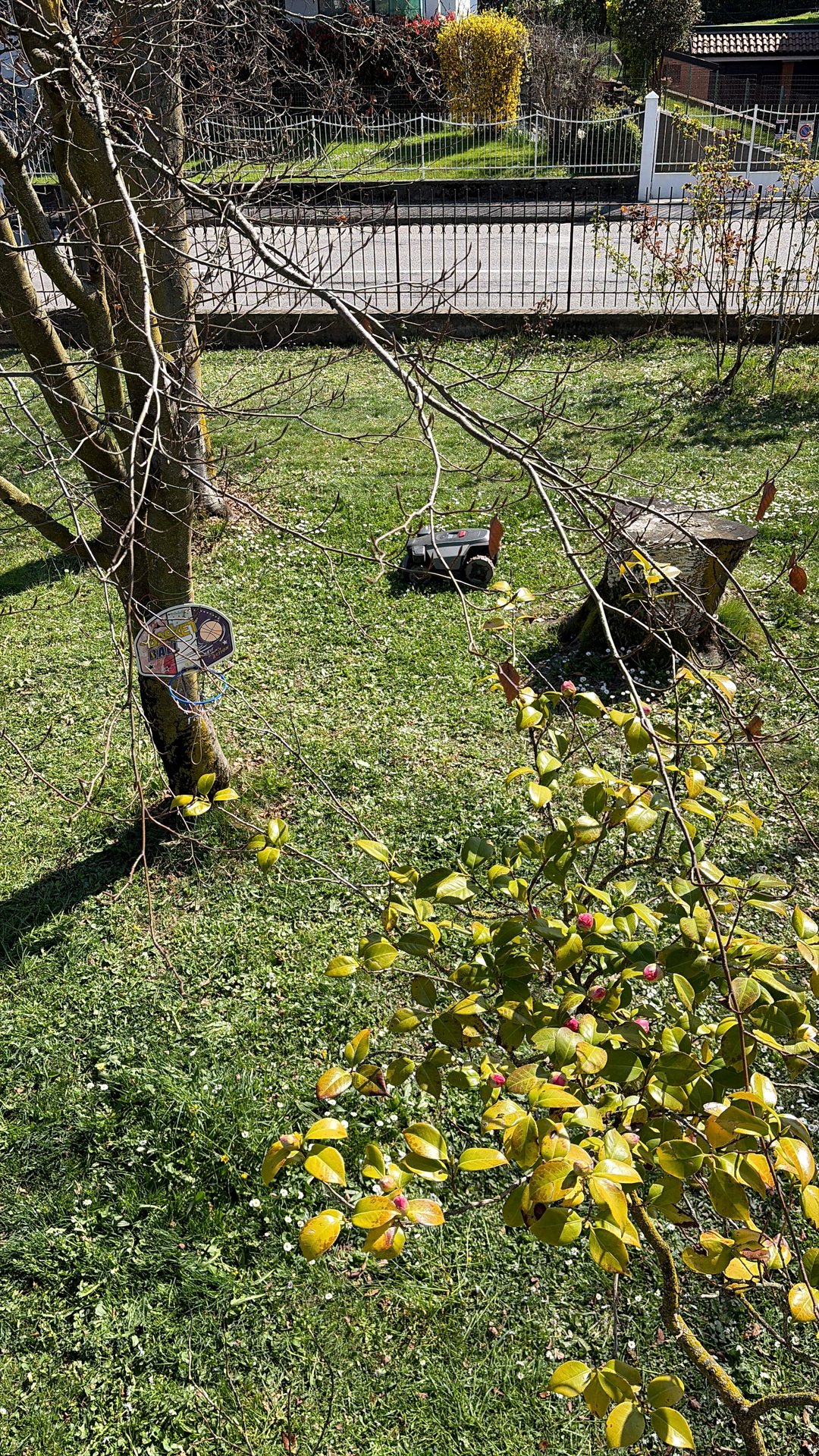
The garden where I tested the RockMow Z1 has a far from trivial sloping area. Roborock states that it can handle slopes of up to 80% (38.7°), a figure I never really put to the test because my steepest slope is considerably lower. But what I can say is that on my slope, even after a night of rain with wet grass, the robot never slips. The all-wheel drive does its part: if one wheel loses grip, the other three make up for it.
The independent spring suspension is noticeable on irregular stretches: the cutting disc stays in contact with the ground even when the robot climbs a small bump, and you can see it in the regularity of the cut. I don't get higher cuts on the mounds, which happened systematically with the perimeter-wire robot I had before.
App and smart home: everything you can do
The Roborock app for lawn mowers belongs to the same family as the robot vacuum apps, with an interface adapted to the logic of the garden. Let's look at the main features, because there really is a lot here.
Live map and telemetry. The main screen shows the map of the garden with the robot's position in real time, the area already mown in a different shade from the area still to be done, the battery status and the estimated time to completion. You see everything at a glance, even from your phone while you're away from home.
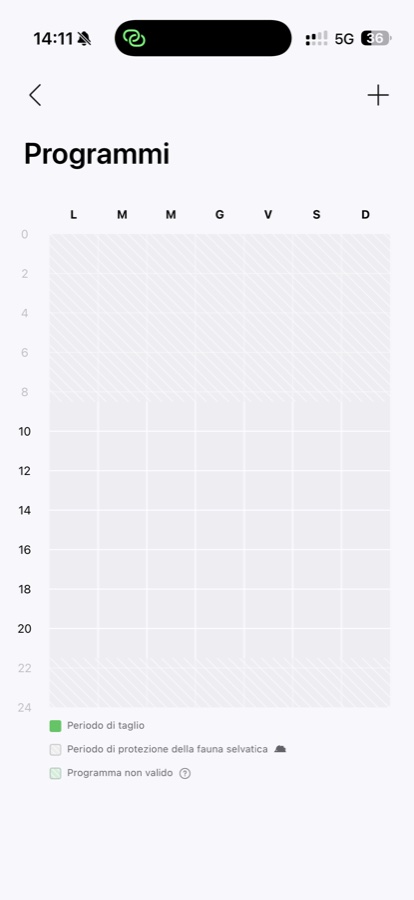
Weekly scheduling. You can set cutting times by day of the week, on an hourly grid reminiscent of a professional calendar. You combine cutting slots with quiet windows (night, early morning, hours that respect the neighbours). For each schedule you choose the areas to cover (the whole garden or a subset of zones).
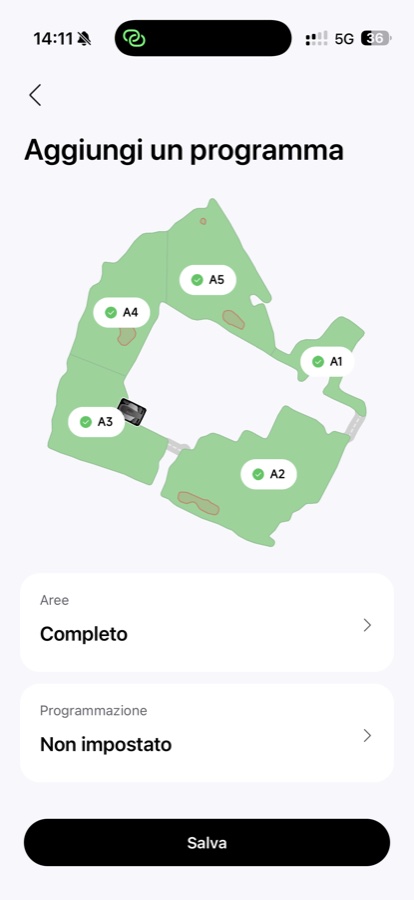
Exclusion zones and multi-zone mode. You can draw areas of the garden that the robot must not touch (vegetable patch, play area, pool zone, flower beds with bulbs). You can create zones with different cutting schedules: the lawn in front of the house mown twice a week, the back lawn three times, the roadside area only when there are no parked cars.
Cutting modes. Besides standard cutting in parallel lines, you can request an "edge" mode (focused on the borders), a "spot" mode (on a specific area), or multiple passes on particularly overgrown zones. The robot recognises the patterns and adapts the speed and density of its passes.
Smart home compatibility. Integration with voice assistants (Alexa, Google Home) lets you start cycles, pause, and ask for the status. For anyone with a connected home, it's a natural addition.
Rain protection: how long to wait before restarting
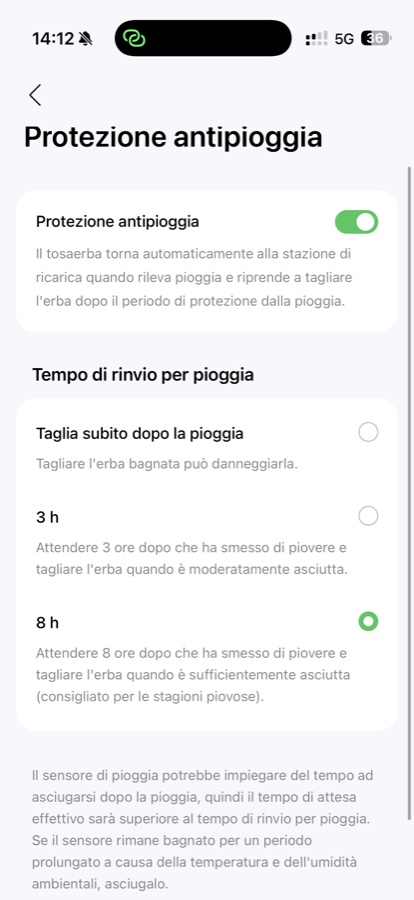
One of the features I use most is the rain protection. The weather sensor sends the robot back to the base as soon as it detects rain, and then manages the postponement of cutting according to a timer chosen in the app: immediately after the rain, 3 hours after, or 8 hours after. I keep it set to 8 hours, which is also the option Roborock recommends for the rainiest seasons: wet grass cuts worse, the blades lose their edge sooner, and the lawn ends up marked. Waiting a "real" block of time before restarting is a small difference that shows in the health of the lawn over the medium term.
Wildlife protection mode
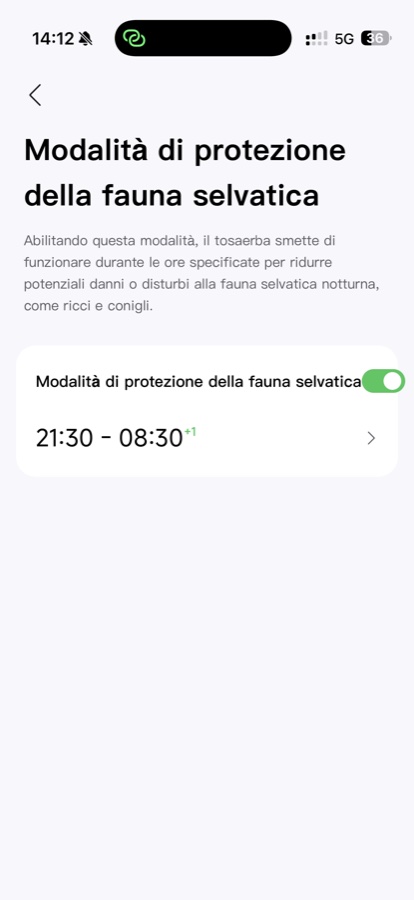
A feature I didn't expect and yet use gladly is the wildlife protection mode. It's a night-time window during which the robot doesn't cut, to reduce the risks for hedgehogs, rabbits and other animals that move around gardens at night. I set it to 21:30–08:30, and it works as a hard block: even if I force a cycle in the app, the robot respects the window. For anyone with a garden near countryside, woodland or public green spaces, it's a feature not to be underestimated.
Security, anti-theft and 4G tracking
A robot lawn mower in this category left in the garden is an expensive device that the neighbours can see. Roborock has worked seriously on the security side, and it's worth understanding how it works.
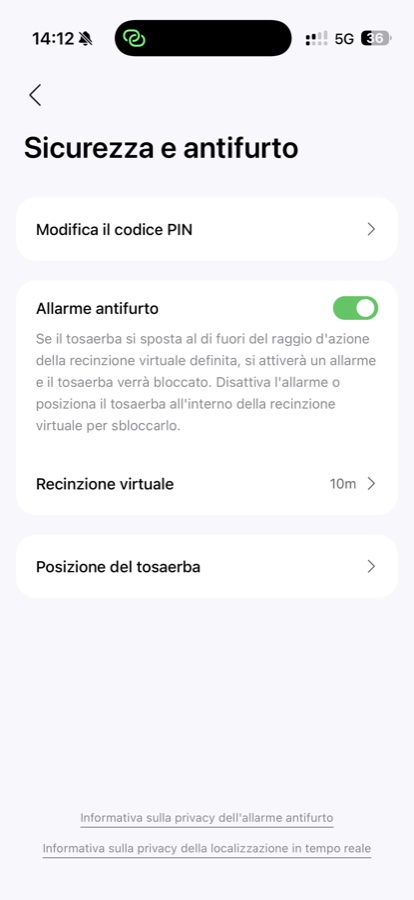
High-volume audible alarm. If the robot is lifted outside the defined work area, an alarm audible from a distance goes off. It isn't a token buzzer: it's designed to attract attention and put off opportunistic theft.
PIN lock. The robot won't start without a PIN. Even someone who manages to carry it off can't use it without the code. Combined with the fact that the integrated 4G SIM keeps transmitting its position, it's a strong deterrent.
Virtual fence. From the app you set a safety radius (10 m in my case) around the work area: if the robot leaves that virtual perimeter, the alarm and lock are triggered. It's the extra safety net on top of the single lift alarm.
Real-time GPS tracking via 4G. Even outside the coverage of your home Wi-Fi, the robot transmits its GPS position to the Roborock server. From the app you can always see where it is. In case of theft, the information is available for the police report.
Dual Wi-Fi + 4G connectivity. The robot can always be reached from the app, even when it is at the farthest point of the garden where the home Wi-Fi doesn't reach. The integrated 4G SIM enables both continuous remote monitoring and anti-theft GPS tracking.
Compatibility with third-party trackers. Roborock states compatibility with additional trackers (e.g. AirTag) fitted to the robot, for redundancy.
Maintenance: what to do and when
On a robot lawn mower in this price bracket, maintenance is minimal but not zero. Roborock has published an official maintenance guide (link at the end) that sums up the sequence well; what I describe is what I actually do, based on months of use.
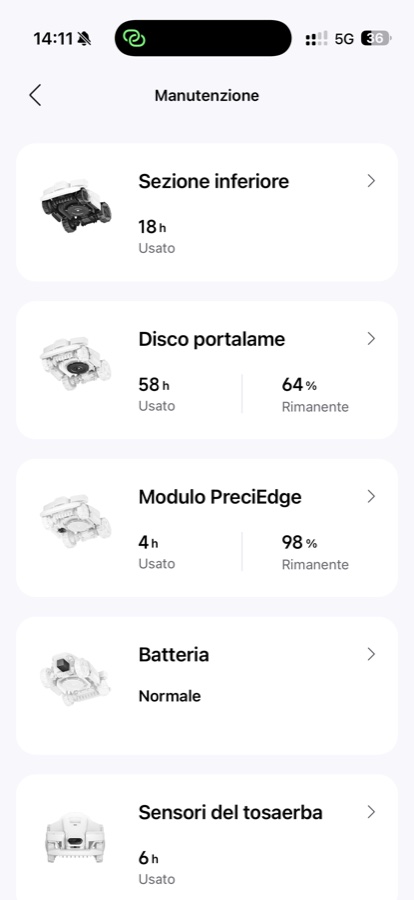
The app keeps track of the hours of use of the individual components — underside, blade carrier disc, PreciEdge module, battery, sensors — and shows the percentage of remaining life for consumable parts. It's a level of transparency that makes planning easier: you know at a glance whether the blades are about to run out, whether the battery is still healthy, and whether the sensors need a look.
Post-cutting clean (weekly). Once a week I lift the robot, check that the wheels haven't built up mud or compacted grass in the treads, and wipe the cameras with a dry cloth. It takes two minutes.
Cutting disc (monthly). The six-blade disc should be checked regularly. Wet grass can build up in the space around the disc, especially after intensive sessions. Roborock recommends a periodic blade check: I inspect them every month and replace them when they lose their edge. They are consumable parts and should be budgeted for as spares.
RTK base (occasional). The RTK antenna is practically fit and forget: once properly positioned, it asks for no attention. The only precaution is to check that it hasn't moved after major weather events (strong wind, heavy snow).
Seasonality. In late autumn, the robot should be stored somewhere dry with the battery half charged. The charging base can stay outside. In early spring you pick it up again, check the RTK fix, and restart the cycle.
Procedural reference: RockMow Z1 / X1 — Maintain Your Mower (official Roborock guide).
Real telemetry: what the app's history says
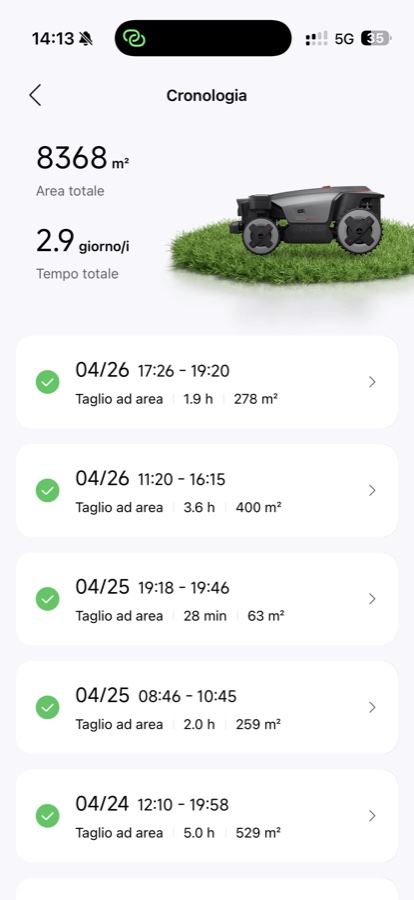
One of the most useful things about the app, when it comes to long-term reliability, is the History section. It shows every single cutting session with date, start time, end time, duration and square metres mown. On top of that, two cumulative figures: total area cut and total working time. Since I've had the robot, I've reached about 8,300 m² cumulative and almost 3 full days of work. Set against classic maintenance with a push mower, those figures equal quite a few hours I haven't spent in the garden with a tool in my hands.
Comparison with the competition
To place the RockMow Z1 in the 2026 market, it makes sense to compare it with the models it competes with directly. The table below is based on the public specifications declared by the respective manufacturers.
| Feature | Roborock RockMow Z1 | Mammotion LUBA 2 AWD 5000 | Husqvarna Automower 450X NERA |
|---|---|---|---|
| Navigation system | RTK + VSLAM (Sentisphere) | RTK + Vision | EPOS RTK (no perimeter wire) |
| Drive | AWD, 4 motors | AWD | Rear-wheel drive |
| Max slope | 80% (38.7°) | 80% (38.7°) | 45% |
| Max area per cycle | 5,000 m² | 5,000 m² | 5,000 m² |
| 4G connectivity | Included | Optional | Optional |
| Wildlife protection mode | Yes (configurable) | Limited | No |
| Built-in anti-theft | Alarm + PIN + GPS | Alarm + PIN | PIN + GPS |
| Perimeter wire | No | No | No |
The RockMow Z1 competes directly in the "premium wire-free RTK" category. The declared values are largely in line with Mammotion and the top-of-the-range Husqvarna NERA, with the advantage of having 4G connectivity included and four-camera obstacle avoidance as standard equipment. The final Italian price will arrive at the launch in early May: it will need to be read against that table to complete the commercial verdict.
A typical day with the RockMow Z1
To give a concrete idea of what it's like to live with the product, here is a typical day.
Early in the morning, the robot leaves the base on its own according to the schedule I've set. I don't hear it start: the noise is low, and from the house the first sign is the notification on the app saying "cycle started". It moves across the garden following the parallel lines of its map, completes the front zone, moves on to the side, and handles the back zone. When it reaches 30% battery it returns to the base, recharges and resumes. All without my having to touch it.
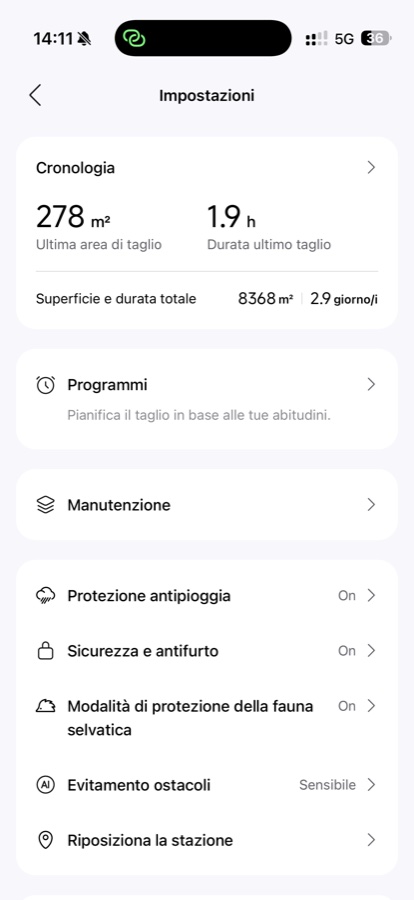
If it starts to rain, the weather sensor sends it back to the base on its own. I get a notification, and the app applies the postponement timer I've set (8 hours in my case). I typically let it decide.
When the garden is complete, I get the end-of-cycle notification with the coverage map: mown areas highlighted, any skipped zones (rarely) flagged. It returns to the base, parks, and that's it.
The only time I physically go out into the garden for the robot is every week or two for routine cleaning — wheels, cameras, a check of the disc. Compared with the hours of push mowing it replaces, that maintenance is not even in the same league.
Real videos: the RockMow Z1 in action in the garden
For those who want to see how it really behaves, here are two short clips from my garden. The first is a session on a lawn full of daisies, the second is the robot cutting in the tree-covered, shady area, where VSLAM does more work than RTK.
Evolving software: the Roborock team is doing a good job
One thing I've noticed during these months of use is how actively the robot's software has been updated. I'm not talking about minor fixes: I'm talking about real improvements to cutting behaviour, obstacle handling and map quality. The Roborock development team is clearly in "listen and improve" mode, and that is added value you don't always find in first-generation products from a manufacturer entering a new segment.
For anyone buying a robot lawn mower at launch, this is an important variable: you aren't just buying the hardware, you're also buying the evolution of the software that will run on it over the coming years. And here Roborock is showing it knows how to handle that.
2026 update: nRTK mode without an antenna is on the way
An important note, confirmed to me directly by the Roborock technical team: during 2026 the RockMow Z1 will receive, via a software update, support for nRTK (Network RTK) mode. It's a paradigm shift for those who already own the robot, and it's worth explaining properly because it affects the critical point of the whole category: the placement of the physical RTK antenna.
What changes with nRTK
Today the RockMow Z1 obtains its centimetre-level fix through the local RTK station, that is, the antenna you've placed in the garden, which corrects the GNSS signal in real time by radio to the robot. It works very well, provided you have a stable open-sky spot to mount it. That isn't always trivial.
With Network RTK, the robot no longer needs the physical station in your own garden. The RTK corrections come from a network of reference stations spread across the territory (conceptually comparable to the NTRIP service used by surveyors), and the robot receives them directly via the integrated 4G SIM and the Wi-Fi connection. Roborock will handle the flow on the cloud side; the user doesn't have to configure anything.
What it means in practice
- No more physical RTK antenna to position. The most underrated problem of the installation, which I wrote about at length above, disappears for those who enable nRTK.
- An even quicker setup: you go from the current three phases (charging base + RTK antenna + mapping) to two (charging base + mapping). For anyone without a stable open-sky spot in the garden, it's the difference between "the product performs at 70%" and "the product performs at 100%".
- The same centimetre precision thanks to the external reference network. The fusion with VSLAM stays unchanged and continues to cover the stretches in canopy shade.
- Confirmation of Roborock's software investment: as I wrote in the "Evolving software" section, the team iterates well, and this update is concrete proof. Anyone buying the Z1 today with the traditional setup can, in a few months, migrate to the nRTK model without changing hardware.
When it arrives and for whom
Roborock has confirmed that the nRTK rollout is planned during 2026 via an OTA firmware update, distributed gradually by region depending on the coverage of the reference station network. For existing RockMow Z1 owners, activation will be handled through the Roborock app once it becomes available in their country; no additional purchases or changes to the existing hardware are required.
For anyone considering a purchase now who has no optimal spot for the physical antenna, this is news that changes the calculation: the one truly critical variable of the current setup is set to become optional. For anyone who has already installed the RTK antenna in a perfect position, no problem: local RTK mode will remain supported, and with your own physical station the corrections are independent of the 4G SIM's network coverage.
Frequently asked questions
Does it work in the rain? Yes, the RockMow Z1 has IPX6 certification and can work even on a wet lawn. That said, it has an integrated rain sensor and by default returns to the base if the rain is heavy: better for the quality of the cut (wet grass cuts worse) and for blade life. From the app you set the postponement timer (immediately, 3 hours, 8 hours).
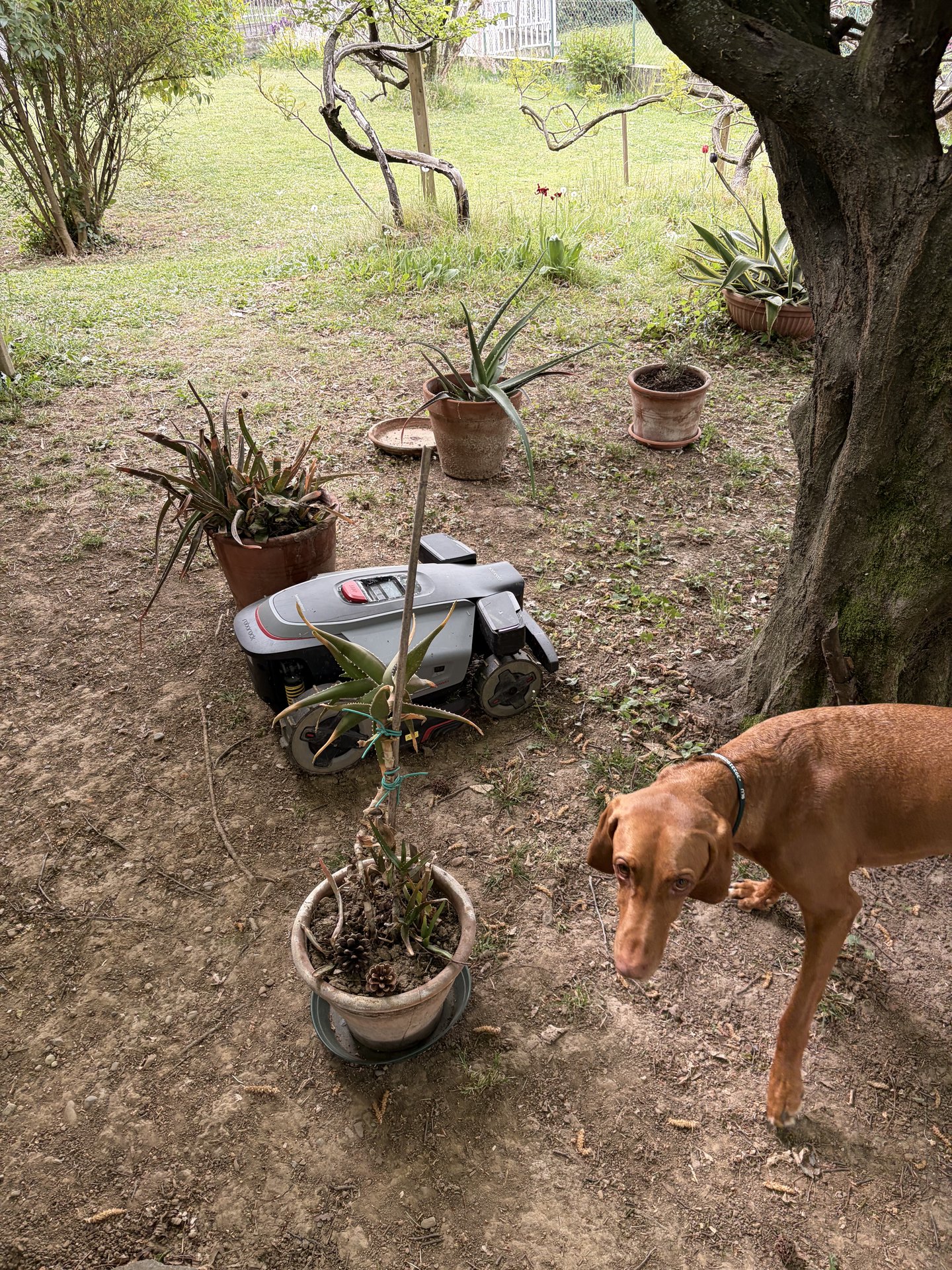
Can I use it if I have a dog? Yes. The four-camera obstacle avoidance recognises animals. That said, it's basic prudence not to leave the dog in the garden unsupervised while the robot is cutting, especially the first few times. They get used to it quickly, but at first the encounter needs managing.
Does it work at night too? Technically yes, but the RGB cameras need light for the obstacle avoidance system. There is also a wildlife protection mode, configurable from the app, that blocks cutting during a night-time window chosen by the user so as not to disturb hedgehogs, rabbits and the like. Most Italian municipalities have noise regulations that discourage night-time mowing anyway.
Does the 4G SIM cost extra? Roborock states that 4G connectivity is a basic function and is included. For details on the cost of data traffic over the long term (after the initial years), I recommend asking the retailer for confirmation at the time of purchase.
How noisy is it? Subjectively, it is quieter than an electric push mower. From inside the house with the windows closed, I can't hear it. In the garden, it's an acceptable presence even during a conversation. Roborock does not publish a dB figure in its public specifications.
What happens if the garden doesn't have a clear sky for the RTK antenna? Without a stable open-sky spot for the RTK antenna, navigation performance drops noticeably. If your garden is completely covered by tall canopies, it's worth considering a rooftop antenna or, alternatively, a traditional perimeter-wire robot.
How long does the battery last? Roborock states coverage of up to 5,000 m² per cycle thanks to fast charging — the robot returns to the base on its own and sets off again. For medium-sized gardens, a cutting session is handled without interruption; for larger gardens, a charge-and-resume cycle may be needed, automatic and managed by the robot itself.
Can I update the software? Yes, firmware updates are OTA via the app. Roborock releases them fairly frequently, and over the months of use I've seen tangible improvements with every release.
When will nRTK mode arrive on the RockMow Z1? The Roborock team has confirmed the rollout via a firmware update during 2026. Network RTK mode will use the robot's integrated 4G SIM and Wi-Fi to receive RTK corrections from a network of external reference stations, removing the need to install the physical RTK antenna in the garden. The centimetre precision stays identical and the update will be free for those who already own the robot.
Who the Roborock RockMow Z1 is for
Thinking of those who ask me for advice before buying a robot lawn mower in this price bracket, here are the profiles where the Z1 really makes a difference.
- Medium-to-large garden (1,500–5,000 m²): this is where the product shows its full potential. Below 1,500 m² there are smaller models that do the same job at a lower cost.
- Slopes and uneven ground: all-wheel drive, proper suspension and a floating disc deliver results that lightweight perimeter-wire robots cannot reach. If your garden has "character", the Z1 handles it.
- Allergic to the perimeter wire: anyone who has already experienced the wire breaking, the trench being uncovered, the signal dropping out — knows what they're buying when they switch to RTK + VSLAM.
- Advanced smart home: those who want real-time remote monitoring, integration with voice assistants, 4G coverage and anti-theft GPS.
- The patient buyer: someone willing to invest an extra 30 minutes in the initial placement of the RTK antenna to get months of precise operation.
Who it's NOT for
- Small gardens (under 500 m²): oversized. There are more suitable models, such as Roborock's own RockNeo Q1 or equivalents from other manufacturers.
- Many corridors under 0.8 m: anyone expecting the robot to finish everything will be partly disappointed. The manual brush cutter remains necessary in some tight spots.
- No chance of placing the RTK antenna with a clear sky: gardens completely covered by tall canopies are not the ideal terrain for an RTK robot, whatever the brand.
- Limited budget: the Z1 is the top of Roborock's garden range. Anyone looking for a first robot lawn mower at a modest price should look at the RockNeo Q1 or RockMow S1.
Final verdict: 8.7/10
The Roborock RockMow Z1 is the robot lawn mower that changed my mind about the category. We come from years in which robot lawn mowers were limited, fragile devices, to be set up with cables hidden in the ground and routes that got "lost" at the first regrowth of grass. This is something else: it's a machine that manages your garden rather than endures it.
The only real limit, after months of use, is the finishing in narrow passages — a structural compromise found across the whole category, not a defect specific to Roborock. For the rest, the combination of well-tuned RTK + VSLAM, all-wheel drive, proper suspension, 4G connectivity and a development team improving the software at a steady pace makes this product recommendable without reservation to anyone who fits the target.
While we await the official Italian price, which will arrive at the launch in early May, it is one of the most complete and best-engineered robot lawn mowers currently available.
Full technical specifications
| Maximum area per cycle | up to 5,000 m² |
|---|---|
| Maximum slope | 80% (38.7°) |
| Surmountable obstacle height | 8 cm |
| Minimum passage width | 0.8 m |
| Cutting height | 20–70 mm, adjustable in 0.1 mm steps |
| Edge trimming | 3 cm with PreciEdge module (optional) |
| Blades | 6-blade disc with double anti-tangle layer |
| Navigation | Sentisphere — full-band RTK + VSLAM |
| Obstacle avoidance | Quad Vision, 4 cameras, configurable sensitivity |
| Drive | AWD — independent motor on each wheel |
| Suspension | independent springs, floating cutting disc |
| Connectivity | Wi-Fi + 4G LTE (real-time tracking, remote alarm) |
| Resistance | IPX6, integrated rain sensor with postponement timer |
| Anti-theft | audible alarm, PIN lock, virtual fence, 4G geofencing, third-party tracker |
| Wildlife mode | night-time window configurable from the app |
| Telemetry | session-by-session history, hours of use per module, remaining life of consumables |
| Software updates | OTA via the Roborock app |
| Availability in Italy | early May 2026 |
See also: Roborock Saros 20 Sonic — the review of the best robot vacuum cleaner of 2026 · Roborock Qrevo S Pro arrives in Italy · preview review of the RockMow Z1 from IFA 2025 · all the SpazioITech reviews.
Technical specifications source: official Roborock RockMow Z1 page. Procedural references: official Unboxing & Setup video and official Maintain Your Mower video (Roborock Support channel). The assessments of how it works refer to my use in my home garden since February 2026; the app screenshots are taken from my device.
Roborock RockMow Z1
Translated from the Italian original. Read in Italian


