
The HomeBase 3 is the piece I added once I realised that, with three eufy devices running at home, I was wasting time hopping from one camera to another. Since it's been in place, the ecosystem works like a proper video surveillance system: face recognition that learns, centralised storage, cross-camera tracking. No subscription. Let's see whether it's worth the money.
Category: Central hub / local NVR for the eufy Security ecosystem with BionicMind on-device AI
Test period: running for over a year with SoloCam, doorbell and indoor cam connected
Review summary (for those in a hurry):
- What it is: the central hub for the eufy Security ecosystem: it manages cameras/doorbells/floodlights, enables BionicMind (face/familiar face recognition), expands storage up to 16 TB with an internal HDD, and provides cross-camera tracking and local AES-128 encryption
- Who it's for: anyone who already has two or more eufy devices, or is planning a system from scratch, and wants advanced AI plus a long video history without subscriptions
What the HomeBase 3 really is
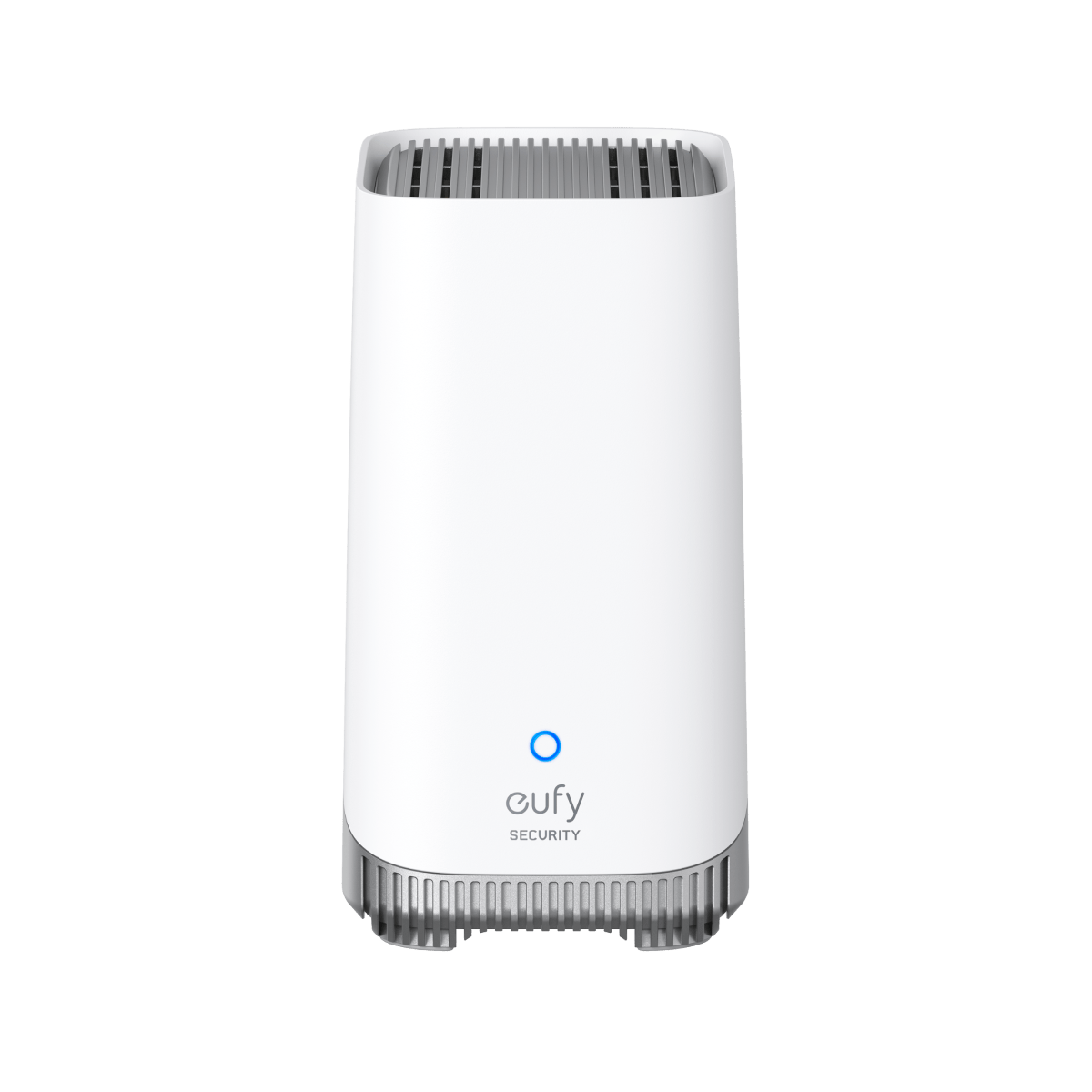
The HomeBase 3 (model code S380) isn't a camera: it's the brain that ties the other eufy cameras together. Eufy calls it an "Edge Security Center", which is a fancy way of saying local NVR + AI box + storage server. Compact (16 × 16 × 7 cm, ~620 g), it sits on a shelf and connects to the router by Ethernet or Wi-Fi. It has 16 GB of internal eMMC memory and a bay for a 2.5-inch HDD (not included), expandable up to 16 TB. When a compatible eufy camera comes online, the S380 takes over centralised storage, hooks up the BionicMind AI and enables features that a single camera can't manage on its own.
BionicMind: real, local face recognition
The part that really justifies the price is BionicMind, the on-device artificial intelligence system that runs on the hub. It isn't cloud, it isn't an external API: all the facial recognition, advanced person/pet detection and cross-camera tracking is processed on the hub itself, inside your home, without a single frame leaving the house.
In my tests, after uploading 5-10 photos of each family member's face, BionicMind reaches an accuracy close to 99% in recognising who rings the bell or walks past the cameras. Notifications become contextual: "your son has arrived home" instead of "motion detected". "Familiar faces" are managed from the app, where you can also manually tag unrecognised people (the regular courier, the neighbour) to enrich the model. Cross-camera tracking means that if a person arrives at the gate (eufyCam), then at the door (Video Doorbell E340) and then comes inside (Indoor Cam), the system recognises that it's the same person and shows you their "route".
Storage: the real reason I bought it
The individual eufy cameras have small internal storage (typically 8 GB, about a week of clips with average use). With the HomeBase 3 you slot in a 4 TB HDD and, in my case, that covers over six months of continuous clips for four cameras. Compatible drives are standard 2.5-inch SATA HDDs (Seagate Barracuda 2 TB at around €70, WD Blue 4 TB at around €120). Fitting it is open, unscrew, close: barely ten minutes.
Storage is centralised and indexed: from the app you search clips by day, time, camera, event type and recognised person. With storage spread across several cameras that would be unmanageable. It is literally the piece that turns "I have a few Wi-Fi cameras" into "I have a surveillance system".
Camera compatibility: almost the entire recent catalogue
The HomeBase 3 fully supports (storage + AI) practically the whole modern eufy range:
- eufyCam 3 and 3C, S330, S300
- SoloCam S340, S330, E30, S230, S220
- Floodlight Cam E340
- Video Doorbell E340 and other recent models
- Indoor Cam E220, C220, S350
Older models such as the eufyCam 2C (2020) can be connected to take advantage of centralised storage, but they don't unlock the new AI features (BionicMind, familiar face): the limit is the hardware on the camera, not on the hub.
Setup: patience for the first few days, then forget about it
The hardware installation is trivial: plug in the power supply, connect the Ethernet cable to the router (strongly recommended over the hub's own Wi-Fi) and off you go. The eufy app guides you through pairing the first camera in 2-3 minutes. The part that takes patience is training BionicMind: for each family member you upload 5-10 photos, front-on, side-on and with different expressions, or you let it learn live (you tag the faces it sees and rename them). After 2-3 weeks of "passive training", the system recognises the regulars with very high accuracy.
Real limitations
The first, which needs saying clearly: the HomeBase 3 has 2.4 GHz Wi-Fi only, not 5 GHz or Wi-Fi 6. In a home with lots of devices (smart TVs, computers, tablets), the 2.4 GHz band tends to get congested, and live streaming throughput can suffer. The fix is to connect it by Ethernet, which is what I always recommend, or to dedicate a less crowded channel on the 2.4 GHz band.
Second: no built-in UPS or battery backup. If the power goes, everything goes. If you live in an area with frequent blackouts, it's worth adding a small UPS (€60-80) to cover the hub and the router.
Third: the HDD isn't included. That's an additional €50-130 depending on the capacity.
When it's worth it and when it isn't
The HomeBase 3 is worth the money if you have (or are installing) at least 2-3 eufy devices. With a single camera, the benefit is limited to expandable storage, and that sometimes doesn't justify the cost. With three or more, BionicMind + cross-camera tracking + shared storage make the difference between "random smart cams" and a "home security system". For anyone who has just started the eufy ecosystem with the Video Doorbell E340 or the SoloCam S340, it is the natural next expansion.
Comparison with the competition
| Product | Type | AI face recognition | Storage | Cloud required | Compatibility | Price (without HDD) |
|---|---|---|---|---|---|---|
| eufy HomeBase 3 | All-in-one hub + NVR + AI | Yes (on-device BionicMind) | up to 16 TB (1 bay) | No | eufy cameras | ~€129-199 |
| Synology DVA1622 | NVR + AI | Yes (DVA-only) | up to 32 TB (2 bays) | No | ONVIF/Synology cameras | ~€500 |
| Reolink NVR RLN8-410 | Pure NVR | Not natively | up to 24 TB (4 bays) | No | Reolink/ONVIF cameras | ~€300 |
Full specifications
| Function | Central eufy Security hub / local NVR / BionicMind AI |
|---|---|
| Built-in storage | 16 GB eMMC + internal 2.5" HDD bay |
| Maximum storage | up to 16 TB with a compatible HDD |
| On-device AI | BionicMind: face recognition, familiar face, advanced pet detection, cross-camera tracking |
| Connectivity | 2.4 GHz Wi-Fi, Ethernet RJ45, Bluetooth |
| Encryption | AES-128 + military-grade end-to-end |
| Camera compatibility | eufyCam 2/2C/2 Pro/3/3C, SoloCam S340/E30/S230/S220, Floodlight E340, Doorbell E340 and others |
| Audio | Built-in speaker (chime / siren on trigger) |
| Model (EU) | T80303D1 |
| Dimensions / weight | 169 × 169 × 70 mm · ~620 g |
| Subscription | None required for AI or storage |
Frequently asked questions
Which HDD should I buy for the HomeBase 3? Any 2.5-inch SATA HDD, from 1 to 16 TB. For cost and reliability I recommend a Seagate Barracuda 2 TB (~€70) or a WD Blue 4 TB (~€120). NVMe drives and SSDs aren't supported.
Does it work without an internet connection? Yes, entirely locally. Without internet the cameras record to the hub, BionicMind keeps working, and the app connects over the local network. Only external push notifications require internet.
Do I have to pay a subscription for BionicMind? No. All the AI features (face recognition, pet detection, familiar face, cross-camera tracking) run on-device on the hub and are free for the life of the product.
Does it replace existing HomeBase 1 / 2 units? Yes, if you want BionicMind and HDD storage. The original HomeBase 2 units (included in the eufyCam 2C kits) remain functional, but their hardware can't be upgraded. Cameras supported by the 3 can be moved over via the eufy app in a few minutes.
Is it compatible with HomeKit? The hub itself isn't. Cameras moved over to the HomeBase 3 do keep their status, though: the eufyCam 2C stays HomeKit-compatible even after being migrated to the HomeBase 3.
How many cameras can it handle? Eufy states up to 16 connected cameras. In real-world tests, beyond 6-8 cameras the 2.4 GHz Wi-Fi starts to become the bottleneck, even with the hub on Ethernet. For large systems I recommend staggering the triggers and favouring wired cameras.
More reviews in the eufy series on SpazioITech: eufy SoloCam S340 · eufy Video Doorbell E340 · eufy Floodlight Cam E340 · eufy SoloCam E30 · eufy SoloCam S230 · eufy Indoor Cam E220 · eufy Indoor Cam C210 · eufy Indoor Cam C120 · eufy Wall Light Cam S100 · eufyCam 2C.
eufy HomeBase 3 (S380)
Translated from the Italian original. Read in Italian


